
Unreliable office Wi-Fi is rarely caused by one simple problem. Slow browsing may come from too many devices sharing an access point, while dropped video calls may be caused by weak coverage, interference, or poor roaming between access points. Adding another router without understanding the layout can make the network harder to manage rather than more reliable.
For a business, the better approach is to plan Wi-Fi around the way people work. That means considering office size, building materials, device density, meeting-room usage, guest access, security, and future growth. This guide explains the main decisions involved in creating a practical WiFi AP and networking solution in Singapore.
Start with how the office uses Wi-Fi
A floor plan alone does not tell you how many access points are needed. A small office with many laptops, mobile devices, IP phones, wireless printers, and meeting-room screens may require a more carefully designed network than a larger office with light usage.
Before selecting equipment, document the activities that depend on wireless connectivity. Consider whether employees regularly use cloud applications, voice or video meetings, wireless scanners, point-of-sale devices, guest Wi-Fi, or large file transfers. Note the busiest areas, including reception, open-plan workspaces, training rooms, and shared meeting spaces.
It is also useful to separate business-critical traffic from convenience traffic. A guest watching videos should not affect a staff member’s business call, and a visitor’s device should not be able to reach internal servers. These requirements influence the access point configuration, switching equipment, and network segmentation.

Why access point placement matters
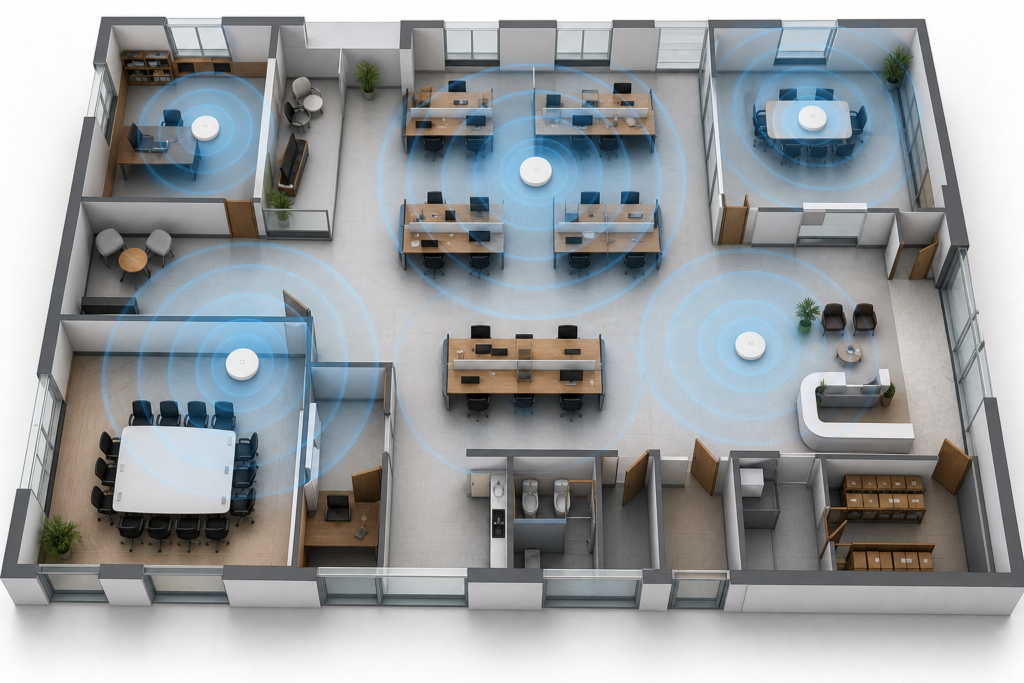
Access points should not simply be installed wherever a network cable is easiest to run. Their position affects signal strength, roaming, capacity, and the amount of interference experienced by nearby devices.
Common obstacles in Singapore offices include reinforced concrete walls, glass partitions with metal films, fire doors, lift areas, server rooms, and dense storage shelving. An access point placed inside a cabinet or behind a large obstruction may provide weaker coverage than expected, even when it appears close to users.
Areas that deserve special attention
- Meeting rooms: Several people may connect at the same time for video calls, presentations, and screen sharing.
- Open-plan workspaces: Device density can be high, particularly during peak working hours.
- Reception and waiting areas: These may require a separate guest network with controlled access.
- Pantries and informal work areas: Users may still expect reliable connectivity away from their desks.
- Storage, warehouse, or back-of-house areas: Wireless scanners and mobile devices may need coverage beyond the main office.
A wireless site survey can identify signal weaknesses, competing networks, channel congestion, and areas where the planned design may not perform as expected. For offices moving into a new space, a predictive survey based on floor plans can be followed by an on-site validation after installation.
Coverage is only one part of the design
Businesses often ask how many access points they need, but a useful design also considers capacity. One access point may cover a large area while still struggling to serve many active devices at once. This is especially relevant in training rooms, classrooms, event spaces, and offices with frequent video conferencing.
Equipment selection should match the expected client devices and applications. A network supporting modern laptops, smartphones, wireless displays, and voice devices may benefit from current Wi-Fi standards, suitable radio configuration, and a properly sized wired uplink. The answer should be based on the environment and usage requirements, not simply the highest number printed on a product box.
Wired infrastructure matters, too. Each access point normally requires a stable Ethernet connection and appropriate power, often through Power over Ethernet. Switch capacity, cable condition, rack space, uplink bandwidth, and backup power should be checked as part of the same project. This is where a broader system integration and IT setup service can help coordinate wireless, switching, cabling, and related office technology.
Plan for smooth roaming
Employees should be able to move from a desk to a meeting room without manually reconnecting every device. Reliable roaming depends on consistent access point configuration, sensible cell design, compatible client devices, and appropriate authentication settings.
Installing access points too close together and running all of them at maximum power can create overlapping cells and client confusion. Installing too few can leave coverage gaps and force devices to hold onto a distant access point. A good design aims for balanced coverage, predictable handover, and enough capacity where users actually gather.
Voice and video applications make roaming issues more noticeable. If wireless connectivity supports a business phone system or collaboration platform, the network should be assessed for latency, packet loss, and interruption during movement, rather than judged only by a basic speed test at a desk.
Separate staff, guest, and operational traffic
Security should be designed before the Wi-Fi passwords are distributed. At minimum, many offices need separate wireless access for employees and visitors. Some environments may also need a dedicated network for voice devices, scanners, building systems, or other operational equipment.
Useful controls may include business-grade authentication, strong encryption, VLAN separation, firewall policies, client isolation for guests, and restricted management access. Guest users should receive internet access without visibility of internal file servers, printers, or administrative systems. Staff access should follow the company’s identity and security requirements rather than relying on one shared password that never changes.
Wireless security also includes the management platform. Administrative accounts should be protected, firmware should be reviewed regularly, and access point configurations should be backed up where the platform supports it. A managed solution can make it easier to identify unknown devices, review connection issues, and apply consistent settings across multiple locations.
What to ask before approving a Wi-Fi project
A clear scope helps prevent surprises during installation. Ask the provider to explain how the design was produced and what will be included after the equipment is installed.
- Will the design include a predictive or on-site wireless survey?
- How many users and devices is each area expected to support?
- Which areas require guest, staff, voice, or operational network separation?
- Are cabling, PoE switches, patching, mounting, and configuration included?
- How will performance be validated after installation?
- Who will monitor the network and handle faults or configuration changes?
- Can the design support an office expansion, extra meeting room, or additional wireless devices?
It is also worth confirming whether the proposed equipment can be managed centrally. A single dashboard can simplify firmware reviews, configuration changes, alerts, and troubleshooting, particularly when a business has more than one office or wants a consistent policy across locations.
Testing the network after installation
Installation should end with validation, not just a list of devices that appear online. Testing should cover the areas where people work, including meeting rooms and less obvious locations such as reception, pantry areas, and storage zones that require connectivity.
Check signal quality, connection stability, roaming, internet performance, internal application access, guest isolation, and performance during realistic busy periods. If voice or video is important, test an actual call while moving between access point areas. Document the final access point locations, switch ports, network names, security settings, and any areas intentionally excluded from coverage.

When professional planning is worthwhile
A basic home-style wireless setup may be adequate for a very small office with limited devices. Professional planning becomes more valuable when the office has dense usage, multiple floors, concrete partitions, frequent video meetings, guest access, business-critical wireless devices, or more than one site.
The right provider should look beyond access point sales. They should ask about applications, users, building constraints, security, cabling, switching, support, and future changes. That broader view reduces the risk of solving a coverage complaint while leaving capacity, roaming, or security problems unresolved.
Build a Wi-Fi network that supports the working day
Reliable business Wi-Fi comes from matching access point placement and network design to real working conditions. A site survey, capacity assessment, secure segmentation, suitable switching, and post-installation testing provide a stronger foundation than simply adding more hardware.
If your Singapore office is experiencing dead zones, unstable calls, overloaded meeting-room Wi-Fi, or difficulty managing multiple access points, speak with Data Dynamics about your Wi-Fi AP requirements. A structured assessment can help identify the right next step, whether that is a redesign, an expansion, or better management of the existing network.